AI Mobile Coders
Content Delivery Networks (CDN) for Mobile System Design
You’re standing in a metro in Delhi. You open Instagram. Within one second, your screen fills up — a photo your friend posted in New York, a reel from a creator in Brazil, a story from someone in Tokyo. You scroll, and it all just appears. No waiting. No spinning loader.

Now stop for a second and think about what just happened.
That photo from New York didn’t magically teleport to your phone. It’s actual data — and data has to physically travel. If Instagram had just one server sitting in California, every single image on your feed would have to travel from California, across the Pacific Ocean, through undersea cables, into India, and finally onto your phone. That’s about 13,000 kilometers for one photo. Now multiply that by every image, every video, every story in your feed. Even at the speed of light, it adds up. Add weak mobile signal, network congestion, and a busy server, and your “instant” feed turns into a frustrating loading screen.
So here’s the real question this blog answers: how do apps used by billions of people, spread across every continent, still feel instant?
The answer is a piece of infrastructure most users never see but every good mobile engineer must understand — the Content Delivery Network, or CDN.
By the end of this blog, you’ll understand exactly what a CDN is, how it makes a photo load in 20 milliseconds instead of 2 seconds, how giants like Instagram and Netflix use it, and how you would use it when building your own app. We’ll cover the full picture — how content travels, how caching works across multiple layers, how to keep private content secure, what it costs, and what to do when the CDN itself fails.
And if you’re preparing for system design interviews, pay close attention. Knowing when to mention a CDN — and being able to explain it clearly — is one of the simplest ways to show an interviewer that you think about real-world systems, not just textbook diagrams.
Let’s start from the beginning.
What is a CDN, Really?
A Content Delivery Network (CDN) is a globally distributed network of servers that stores copies of your app’s content (images, videos, files, sometimes even API responses) close to your users, so that data has to travel a shorter distance.
Think of it like this: Instead of one giant warehouse in California shipping products to everyone in the world, imagine Amazon set up smaller warehouses in every major city. When you order something in Delhi, it ships from the Delhi warehouse — not from California. Faster delivery, less cost, happier customer.
CDN does the same thing, but for digital content.
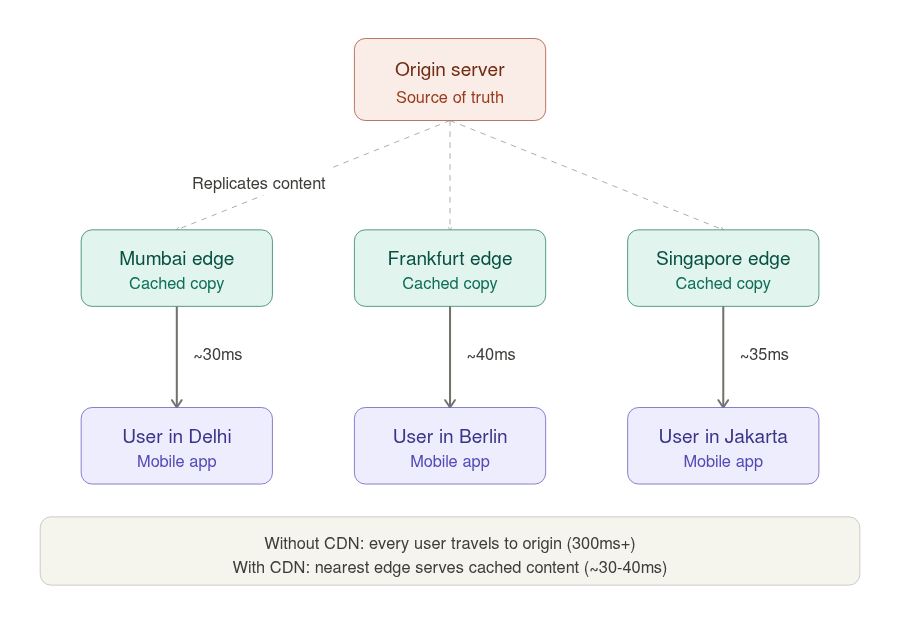
These smaller “warehouses” are called edge servers or Points of Presence (PoPs). They sit in data centers around the world — Mumbai, Singapore, Frankfurt, São Paulo, Sydney, and hundreds of other cities. Each edge server holds a cached copy of your content, ready to serve nearby users in milliseconds.
The Two Key Players: Origin Server vs Edge Server
Before going deeper, let’s understand two important terms you’ll hear repeatedly:
Origin Server is the main server where your content originally lives. This is your “source of truth.” If you’re building an app, this is probably your AWS S3 bucket, your backend server, or wherever your files are first uploaded.
Edge Server is a CDN server located close to users. It doesn’t have your content originally — it fetches a copy from the origin server when needed, then keeps that copy ready for future users in the same region.
Here’s how it plays out in practice:
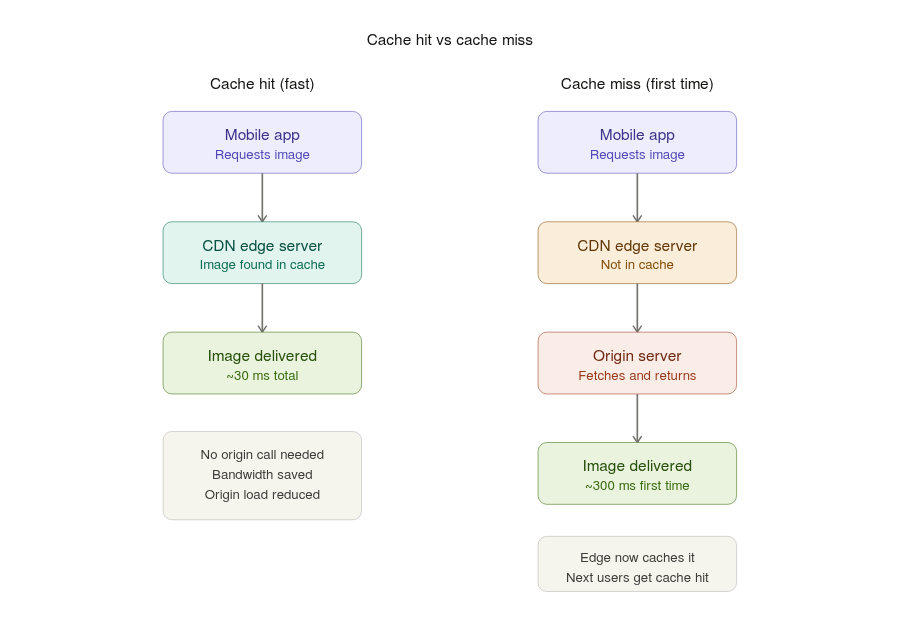
- A user in Delhi opens your app and requests a profile picture.
- The request goes to the nearest CDN edge server — let’s say Mumbai.
- Mumbai edge checks: “Do I have this image cached?”
- If yes (called a cache hit), it serves the image instantly. Done in maybe 20 milliseconds.
- If no (called a cache miss), Mumbai edge fetches the image from the origin server (say, in Virginia, USA), stores a copy for itself, and then serves it to the user. This first request is slower — maybe 300 milliseconds — but every user after that in the Mumbai region gets it from the local cache instantly.
So the first user “pays the cost” of fetching, and everyone after benefits. This is the magic of edge caching.
Why Mobile Apps Need CDNs More Than Anyone Else
You might wonder — websites have used CDNs for decades. What’s special about mobile?
The answer lies in the unique constraints of mobile devices and networks. Let me walk you through them.
Mobile networks are unpredictable. A user might be on 5G in their office, drop to 4G on the metro, switch to weak 3G in a tunnel, and connect to spotty Wi-Fi at a café — all within an hour. Every extra kilometer your data travels increases the chance of a slow or failed request. CDNs reduce that distance dramatically.
Latency matters more on mobile. On desktop, an extra 200 milliseconds is annoying but tolerable. On mobile, users abandon apps that feel sluggish. Studies have shown that a 1-second delay in mobile load time can reduce conversions by 20%. CDNs are one of the biggest tools to cut latency.
Mobile users are everywhere. Unlike a banking website that mostly serves one country, mobile apps like TikTok, WhatsApp, or Uber have users on every continent. Without a CDN, you’d need to either accept terrible performance for distant users, or build your own server infrastructure in 50+ countries (which is enormously expensive).
Data is expensive on mobile. Many users are on metered data plans. CDNs help by serving optimized versions of content — smaller images for slower networks, compressed videos, modern formats like WebP that are 30% smaller than JPEG. This saves users’ money and battery.
Battery and CPU are limited. Every byte your app downloads costs battery. Every failed retry costs more battery. CDNs reduce both download time and failure rates, which directly extends battery life.
What Kind of Content Goes Through a CDN?
In a typical mobile app, CDNs handle anything that is:
- Large in size
- Doesn’t change frequently
- Same for many users (or can be cached per user)
Common examples include profile pictures and user-uploaded photos, video files (both short reels and long movies), product images in e-commerce apps, static assets like icons and illustrations bundled with remote config, audio files in music or podcast apps, PDF documents and attachments, app update binaries in some cases, and even API responses that don’t change often (like a list of countries or product categories).
What typically does not go through a CDN: real-time personalized data (your chat messages, your bank balance, your live location), anything that changes per user per second, and highly sensitive data that should never be cached anywhere except your secure backend.
How a CDN Actually Works
Let’s trace a real example. You’re building a photo-sharing app, and a user in Bangalore opens their feed.
Step 1: DNS Resolution
The app needs to fetch an image from a URL like https://cdn.myapp.com/photos/12345.jpg. The phone first asks: "Where is cdn.myapp.com?"
Here’s where CDN magic begins. The DNS system is configured to return different IP addresses based on the user’s location. A user in Bangalore gets the IP of the Mumbai edge server. A user in London gets the IP of the Frankfurt edge server. This is called geographic DNS routing or GeoDNS.
Step 2: Connection to the Nearest Edge
The phone connects to the Mumbai edge server. Because it’s geographically close, the TCP handshake and TLS handshake complete quickly — maybe 50–80 milliseconds instead of 300+ for a transcontinental connection.
Step 3: Cache Lookup
The Mumbai edge looks up photos/12345.jpg in its cache. Two scenarios:
Cache hit: The image is already there. It’s sent to the phone immediately. Total time from request to first byte: maybe 30–100 ms.
Cache miss: The image isn’t there. The edge server quietly fetches it from the origin server (perhaps in Virginia), saves a copy locally, and forwards it to the phone. This first request is slower, but subsequent requests for the same image from any Bangalore-area user will be cache hits.
Step 4: Delivery to the Phone
The image streams down to the phone. The app decodes it and shows it on screen. The user thinks “wow, fast app” and keeps scrolling.
Step 5: Future Requests
The Mumbai edge keeps the image cached for some duration (called TTL — Time To Live). This might be a few hours, a few days, or even longer depending on how the developer configured it. During this time, thousands of nearby users can fetch the same image without ever touching the origin server.
Push CDN vs Pull CDN
There are two main models for how content gets into the CDN, and choosing the right one matters in mobile system design.
Pull CDN (the lazy approach)
In a pull CDN, the edge server only fetches content from the origin when a user actually requests it. The first user “pulls” it into the cache, and everyone after benefits.
This is great for user-generated content where you don’t know in advance what will be popular. Instagram doesn’t know which of the billions of photos uploaded today will go viral, so it lets the CDN pull them on demand. If a photo never gets viewed, it never even enters the CDN — saving storage costs.
Push CDN (the eager approach)
In a push CDN, you proactively upload content to the CDN before any user requests it. The CDN edges already have the content ready when the first user asks.
This is useful for things like app launch assets, marketing campaign images, video files for a new movie release, or anything where you know exactly what users will request and you want zero “first user pays the cost” delay.
In practice, most mobile apps use pull CDNs for user content (because there’s too much variety to push everything) and push CDNs for critical, predictable assets.
What Does a CDN Actually Cost?
CDNs save money on one side but cost money on another, and a good engineer understands both.
The biggest cost is egress bandwidth — the data the CDN sends out to users. CDN providers charge you per gigabyte delivered. If your app serves a viral video a million times, that’s a million downloads you pay for. The good news: CDN bandwidth is usually cheaper than serving the same data directly from your origin server, and it saves your backend from melting under load.
The second cost is per-request pricing. Many CDNs charge a tiny amount for every single request (often per 10,000 requests). For an app serving millions of small images, this adds up.
A subtle point: pricing varies by region. Delivering content in North America or Europe is cheap. Delivering the same content in India, South America, or Africa often costs more, because infrastructure there is more expensive for the provider. So a global app’s CDN bill depends a lot on where its users are.
This also explains a real tradeoff with Multi-CDN setups (which we’ll discuss later under reliability). Using two CDN providers improves reliability, but you now pay two bills and lose some volume discounts. Reliability and cost pull in opposite directions — and choosing the balance is exactly the kind of decision interviewers want to hear you reason about.
The overall rule: a CDN lowers your origin and compute costs and improves performance, but you trade that for a bandwidth and request bill. For media-heavy apps, this trade is almost always worth it.
Securing Content with Signed URLs
Here’s a subtle problem. If your CDN URL is just https://cdn.myapp.com/photos/12345.jpg, then anyone with that URL can access the photo — even if they're not logged into your app. For public content like meme images, that's fine. But what about private content?
Imagine a paid course app where users buy access to video lectures. You absolutely cannot have those videos accessible to anyone who guesses the URL. But you also want CDN benefits like fast delivery and edge caching.
The solution is signed URLs (also called pre-signed URLs or tokenized URLs).
A signed URL is a normal CDN URL with extra parameters that prove the user has permission and that the URL hasn’t expired. It might look like:
https://cdn.myapp.com/videos/lecture42.mp4?expires=1699999999&signature=abc123xyz
Here’s how it works in a mobile app:
- User taps “Play Lecture 42” in your app.
- The app calls your backend: “Give me access to lecture 42.”
- Your backend checks: “Yes, this user has paid for this course.”
- Backend generates a signed URL valid for, say, 1 hour.
- App receives the signed URL and uses it to stream the video from the CDN.
- CDN checks the signature and expiry. If valid, serves the video. If expired or tampered, rejects with 403.
This way, you get fast CDN delivery and access control. Even if someone shares the URL, it stops working after the expiry time.
Protecting the Infrastructure Itself
Signed URLs protect individual pieces of content — they control who can access which file. But a CDN also protects your system at a much bigger level: the infrastructure itself.
Because all user traffic hits the CDN’s edge servers first, the edge acts like a shield in front of your origin server. This enables several protections:
DDoS protection. In a DDoS attack, someone floods your app with millions of fake requests to crash it. CDNs have massive global capacity, so they absorb and filter this flood at the edge — your small origin server never even sees it.
WAF (Web Application Firewall). Many CDNs can inspect incoming requests and block malicious ones (like hacking attempts) before they reach your backend.
Hotlink protection. This stops other websites from directly embedding your images and videos using your CDN URLs — basically stealing your content and making you pay the bandwidth bill for it.
Rate limiting. The CDN can block a single user or IP that is making too many requests too quickly, which stops abuse and scraping.
Geo-blocking. If your app or content is only licensed for certain countries, the CDN can block requests from everywhere else right at the edge.
So a CDN is not just a speed tool — it’s also a security layer. It keeps your origin server hidden, protected, and lightly loaded.
CDN and Client-Side Caching — A Two-Layer System
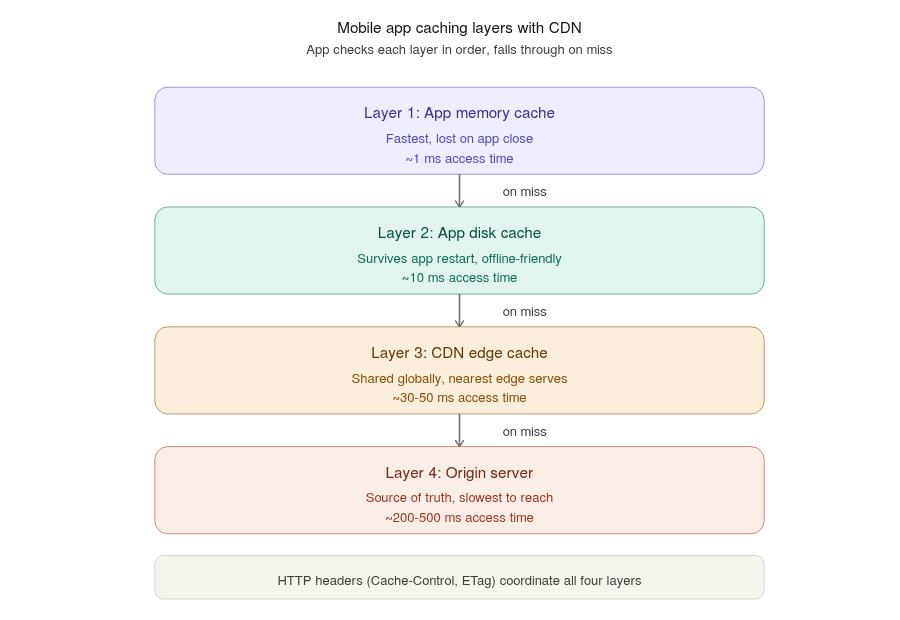
This is where mobile system design gets really interesting. Your mobile app already has its own local cache (which we covered in Chapter 6). Now, with a CDN in the picture, there are actually multiple layers of caching at play:
- App memory cache — fastest, lost when app closes
- App disk cache — fast, survives app restarts
- CDN edge cache — fast, shared with other users in the region
- Origin server — the original source, slowest to reach
In practice, mobile developers rarely build the first two cache layers (memory and disk) by hand. Popular image-loading libraries handle them automatically Glide, Coil, and Picasso on Android, and SDWebImage and Kingfisher on iOS.
These libraries manage memory and disk caching, request deduplication, and placeholder handling for you, so you mostly just give them a CDN URL and they take care of the rest.
When the app needs an image, it ideally finds it in layer 1 or 2 (no network call needed at all). If not, it makes a network request, which hits layer 3 (CDN edge). Only on a CDN cache miss does the request travel all the way to layer 4.
The coordination between these layers happens through HTTP cache headers:
Cache-Control: max-age=3600tells both the CDN and the app to keep this resource for 1 hour.ETag: "abc123"is a fingerprint of the content. The app can later ask "do you have a newer version than abc123?" and the CDN responds with just "no, use what you have" (saving bandwidth) or sends the new version.Last-Modifiedworks similarly — the app says "I have a version from this timestamp, anything newer?"
A well-designed mobile app uses these headers intelligently. For example, profile pictures might have a long cache time (they rarely change), while news article thumbnails might have a short cache time (the article might get a new image).
When Content Changes — Cache Invalidation
Caching makes apps fast, but it creates one classic problem: what happens when the content changes before its TTL expires?
Imagine a user updates their profile picture. The new image is now on your origin server. But the Mumbai edge server still has the old picture cached, and its TTL says “keep this for 24 hours.” So for the next 24 hours, everyone in the Mumbai region keeps seeing the old profile picture. The user is confused — “I changed it, why is it still showing the old one?”
This is called the cache invalidation problem, and there are two standard ways to solve it.
Option 1: Purge the cache. Every CDN provides a purge (or “invalidation”) API. Your backend calls it and says “delete photos/12345.jpg from all edge servers." The next request becomes a cache miss, and the edge fetches the fresh copy. This works, but purging is relatively slow, sometimes costs money, and can be heavy if you're updating content constantly.
Option 2: Change the URL (cache busting). This is the trick most large apps actually use. Instead of updating a file in place, you give the new version a new URL. You add a version number or a content hash to the filename or query string:
Old: https://cdn.myapp.com/profile_12345.jpg
New: https://cdn.myapp.com/profile_12345.jpg?v=a1b2c3
To the CDN, the new URL is a brand-new resource it has never seen, so it fetches the fresh copy immediately — no purge needed. The old cached version simply stops being requested and naturally expires later. Because the URL is different every time the content changes, you can safely set very long cache times (even a year) for better performance.
The general principle: for content that never changes, use a versioned URL and cache it forever. For content that might change occasionally, either use versioned URLs or purge when needed.
Smart Image Delivery via CDN
Modern CDNs do much more than just store and serve files. They can transform content on the fly, which is incredibly powerful for mobile.
On-the-fly resizing. You upload one high-resolution image to the origin (say, 4000x3000 pixels). The CDN can deliver it as 200x200 for a thumbnail, 800x600 for a feed view, or 1600x1200 for full-screen view — all from the same source image. The URL might look like:
https://cdn.myapp.com/photos/12345.jpg?w=800&h=600
This saves enormous bandwidth. A phone showing a thumbnail doesn’t need to download a 5 MB image — it gets a 30 KB version perfectly sized for the screen.
A caution with resizing — don’t fragment your cache. There’s a hidden trap here. To the CDN, every unique URL is a separate thing to cache. photo.jpg?w=200, photo.jpg?w=201, and photo.jpg?w=205 are three completely different cache entries, even though they're nearly the same image. If your app requests images at dozens of slightly different sizes — say, matching every device's exact screen width — a single image can end up scattered across 40 or 50 separate cache entries. Each one has to be generated and cached on its own, and each one starts as a slow cache miss. Your cache hit ratio quietly drops.
The fix is simple: use a small set of fixed size presets. Instead of allowing any width, your app only ever requests, say, 3 or 4 standard sizes — a thumbnail, a feed size, and a full-screen size. Now every user in a region hits the same few URLs, those entries stay warm in the cache, and your hit ratio stays high. It’s a small design decision, but mentioning it in an interview shows you understand how CDN caching actually behaves under real traffic.
Format negotiation. The CDN can detect what image formats the user’s device supports and deliver the best one. Modern Android phones support WebP (30% smaller than JPEG). Newer iPhones support AVIF (50% smaller). Older devices get plain JPEG. Same URL, different bytes — automatically optimized.
Text and asset compression. Beyond images, CDNs also compress regular files — JSON API responses, JavaScript, configuration files, fonts. They use compression methods like gzip and the newer, more efficient Brotli. A JSON response that is 100 KB uncompressed might travel as just 20 KB over the network. On a slow mobile connection, this is a big win, and the CDN handles it automatically.
Quality adaptation. Some CDNs can detect the user’s network speed and adjust quality accordingly. A user on 2G in a rural area gets a smaller, more compressed image. A user on 5G gets the full-quality version. This is sometimes called adaptive image delivery.
Video streaming optimization. For video content, CDNs often work with adaptive bitrate streaming (HLS or DASH). The CDN holds multiple quality versions of each video, and the app dynamically requests the appropriate quality based on current network conditions. Netflix and YouTube rely heavily on this.
CDNs also support HTTP range requests for video. A range request lets the app ask for only a specific portion of a file instead of the whole thing. This is what makes video seeking work — when a user drags the progress bar to the middle of a video, the app requests only the bytes from that point onward, instead of downloading everything from the start. It also lets the app download a video in smaller chunks, which is gentler on mobile memory and network.
Edge compute. Modern CDNs do more than store and transform files — they can actually run code at the edge. Tools like Cloudflare Workers and AWS Lambda@Edge let you execute small programs on the edge servers themselves. This means tasks like checking authentication, rewriting requests, A/B testing, or personalizing a response can happen close to the user, without a round trip to your origin server. The “edge” is slowly becoming a place to run logic, not just a place to store files.
When the CDN Fails — Designing for Reliability
CDNs are highly reliable, but they’re not magical. They can go down. Edge servers can have issues. DNS routing can mess up. As a mobile engineer, you need to design for these scenarios.
Fallback to origin. If the CDN URL fails, can your app try fetching directly from the origin server? This costs more and is slower, but it keeps your app working when the CDN has issues.
Multi-CDN setup. Large apps often use two or more CDN providers (like Cloudflare + Akamai). If one is having a regional outage, the app automatically routes to the other. This is usually configured at the DNS level rather than in the app itself.
Graceful degradation. If images fail to load, your app shouldn’t crash or show ugly broken-image icons. Instead, show something pleasant in the meantime. Common techniques include progressive JPEGs (the image loads blurry first, then sharpens), LQIP (Low-Quality Image Placeholder — a tiny, fast-loading version shown until the real one arrives), and BlurHash (a tiny string of text, stored with the metadata, that the app turns into a soft blurred preview of the image). These make loading feel smooth and intentional, and keep the app looking polished even when content delivery is slow or failing.
Aggressive client caching. If you cache images well on the device, brief CDN outages become invisible to the user — they keep seeing cached content.
Serve stale content when needed. Two HTTP cache directives are extremely useful on mobile, and both let the app or CDN keep a user happy even when things aren’t perfect:
stale-while-revalidate— serve the slightly old cached version instantly, and quietly fetch the fresh version in the background for next time. The user sees zero delay; the update arrives on the next view.stale-if-error— if the origin server is down or returns an error, serve the old cached version instead of showing a failure. The user keeps seeing content, and never knows there was a problem behind the scenes.
For mobile apps, where networks are flaky and a failed request is common, “show something slightly old” is almost always better than “show an error.”
Measuring Your CDN — Cache Hit Ratio and Monitoring
You can’t improve what you don’t measure. The single most important CDN metric is the cache hit ratio.
The cache hit ratio is simply: out of all requests, what percentage were served from the edge cache (a hit) versus had to go all the way to the origin (a miss). If 95 out of 100 requests are hits, your cache hit ratio is 95%.
A high cache hit ratio is what you want. It means:
- Users get fast responses, because most content comes from the nearby edge.
- Your origin server is lightly loaded, because it rarely gets contacted.
- Your bandwidth costs are lower.
A low hit ratio is a warning sign. It usually means your TTLs are too short, your URLs change too often, or your content is too personalized to cache well. For a media-heavy mobile app, aiming for a cache hit ratio of 90%+ is a reasonable goal.
Beyond hit ratio, a few other things are worth monitoring: edge latency (how fast edges respond), error rates (how many 4xx/5xx responses users get), bandwidth usage per region (to track cost), and origin load (to confirm the CDN is actually shielding your backend). Every major CDN provider gives you a dashboard for all of this.
In a system design interview, casually saying “we’d monitor the cache hit ratio and aim for 90%+” is a small line that signals real-world experience.
Mobile-Specific Considerations You Must Think About
A few subtle but important points specifically for mobile:
DNS resolution cost is real. Every new domain your app hits requires a DNS lookup, which on mobile networks can take 100–300 milliseconds. If you use multiple CDN domains, you’re paying this cost multiple times. Smart apps preload DNS resolution at app start or reuse a single CDN domain for all assets.
HTTPS handshake adds overhead. The TLS handshake to establish a secure connection takes a few round trips. Once established, the app should reuse the connection for multiple requests. Modern protocols like HTTP/2 and HTTP/3 (QUIC) make this much better, and most CDNs support them. Always prefer CDNs that support the latest protocols.
Connection reuse matters more on mobile. Opening a new TCP+TLS connection on a 3G network can take a second. If your app opens fresh connections for every image, scrolling a feed becomes painful. Use HTTP/2 multiplexing or connection pooling so multiple requests share one connection.
PoP density matters more than total PoP count. Some CDN providers boast about having 300+ PoPs globally, but if none of them are in your target country, it doesn’t help your users. When choosing a CDN for a mobile app, check the PoP locations specifically in your major user regions. For an India-focused app, CDN presence in Mumbai, Delhi, Chennai, and Bangalore matters more than presence in 50 European cities.
Background downloads and prefetching. Mobile apps often prefetch content for offline use or smoother experience (like Netflix downloading the next episode in advance). CDNs make this much more bandwidth-efficient and cost-effective than fetching directly from origin.
A Real Example: How Instagram Uses CDN
Let’s tie it all together by looking at how a real app might use CDN at scale.
When you open Instagram in Bangalore, here’s roughly what happens:
Your app makes an API call to Instagram’s backend (not the CDN) to fetch your personalized feed metadata — list of posts, who liked them, captions, etc. This is dynamic, personalized data that can’t be cached on a CDN.
But the metadata contains CDN URLs for all the images and videos. Like https://scontent.cdninstagram.com/.... Your app then fetches these media files from the nearest CDN edge — for you in Bangalore, that's probably a Mumbai or Singapore PoP.
The CDN delivers properly sized images for your screen and network (the URL contains parameters that tell the CDN what size and quality to deliver). Videos stream using adaptive bitrate, automatically adjusting quality if your connection slows down.
Your phone caches everything locally so that scrolling back up doesn’t re-fetch images. The CDN holds copies for hours or days, so other Bangalore users see your friend’s photo instantly without ever touching Instagram’s main servers in the US.
If you were to design Instagram in a system design interview, drawing a clear CDN box between “Mobile App” and “Backend Servers,” and explaining its role, instantly signals that you understand real-world mobile architecture.
Summary — What to Remember
A CDN is foundational infrastructure for any mobile app that serves media to a global audience. Here’s the quick checklist to keep in your head:
- Core idea — store content on edge servers close to users, so data travels a shorter distance.
- Origin vs edge — origin is the source of truth; edges serve cached copies. First user pays the cost, everyone after benefits.
- Pull vs Push — pull for unpredictable user content; push for known, critical assets.
- Cost — you trade lower origin/compute load for a bandwidth + per-request bill; pricing varies by region.
- Security — signed URLs for per-file access control; DDoS protection, WAF, and hotlink protection for the infrastructure.
- Caching layers — app memory → app disk → CDN edge → origin. Use HTTP headers to coordinate them.
- Invalidation — when content changes, purge the cache or (better) use versioned URLs.
- Smart delivery — on-the-fly resizing, format negotiation (WebP/AVIF), compression (Brotli/gzip), adaptive video.
- Reliability — origin fallback, multi-CDN, graceful degradation, and stale-while-revalidate / stale-if-error.
- Measure it — track cache hit ratio (aim 90%+), latency, and error rates.
- Interview tip — always draw a CDN box between the mobile app and backend whenever media delivery is involved, and be ready to discuss caching, signed URLs, and failure handling.
As a mobile engineer, you won’t build a CDN yourself — you’ll use Cloudflare, Akamai, AWS CloudFront, Fastly, or Google Cloud CDN. But understanding how they work, how to integrate them, and how to handle their failures is what separates a toy design from a real one.
Thank you for reading. 🙌🙏✌.
Need 1:1 Career Guidance or Mentorship?
If you’re looking for personalized guidance, interview preparation help, or just want to talk about your career path in mobile development — you can book a 1:1 session with me on Topmate.
I’ve helped many developers grow in their careers, switch jobs, and gain clarity with focused mentorship. Looking forward to helping you too!
Found this helpful? Don’t forgot to clap 👏 and follow me for more such useful articles about Android development and Kotlin or buy us a coffee here ☕
💥 Level Up Your Mobile Developer Interview !
Mastering AI for Android Developers
Your complete hands-on guide to integrating AI into Android apps — covering Generative AI, LLMs, on-device intelligence, AI APIs, real-world use cases, and practical implementation with modern Android development.
👉 Grab your copy now:
https://medium.com/@anandgaur2207/mastering-ai-for-android-developers-5cc6d62e7d21
Crack Android Interviews Like a Pro
Your complete Android interview preparation book — packed with real questions, deep explanations, and practical insights to help you stand out.
👉 Grab your copy now:
https://medium.com/@anandgaur2207/crack-android-interviews-with-confidence-the-only-handbook-youll-need-b87ec525f19c
iOS Developer Interview Handbook
From Swift fundamentals to advanced iOS concepts — a complete handbook to help you prepare smartly and confidently.
👉 Explore the book:
https://medium.com/@anandgaur2207/crack-ios-developer-interviews-with-confidence-the-complete-ios-developer-handbook-f1eabc3d7a21
Flutter Developer Interview Handbook
Ace your next Flutter interview with scenario-based questions, detailed explanations, and hands-on examples that make you stand out.
👉 Explore the book:
https://medium.com/@anandgaur2207/crack-flutter-developer-interviews-with-confidence-the-complete-flutter-developer-interview-6cb53996832c
React Native Developer Interview Handbook
Crack your next React Native interview with confidence!
This guide is packed with scenario-based questions, detailed explanations, and hands-on examples to help you stand out and succeed.
👉 Explore the book:
https://medium.com/@anandgaur2207/react-native-interview-crack-your-next-interview-with-confidence-0d7255a20fe1
If you need any help related to Mobile app development. I’m always happy to help you.
Follow me on: