 AI Mobile Coders
GenUI: The Future of UI in Mobile Apps
How AI is quietly rewriting the rules of every app on your phone — and why the next decade of mobile design will look nothing like the last one.

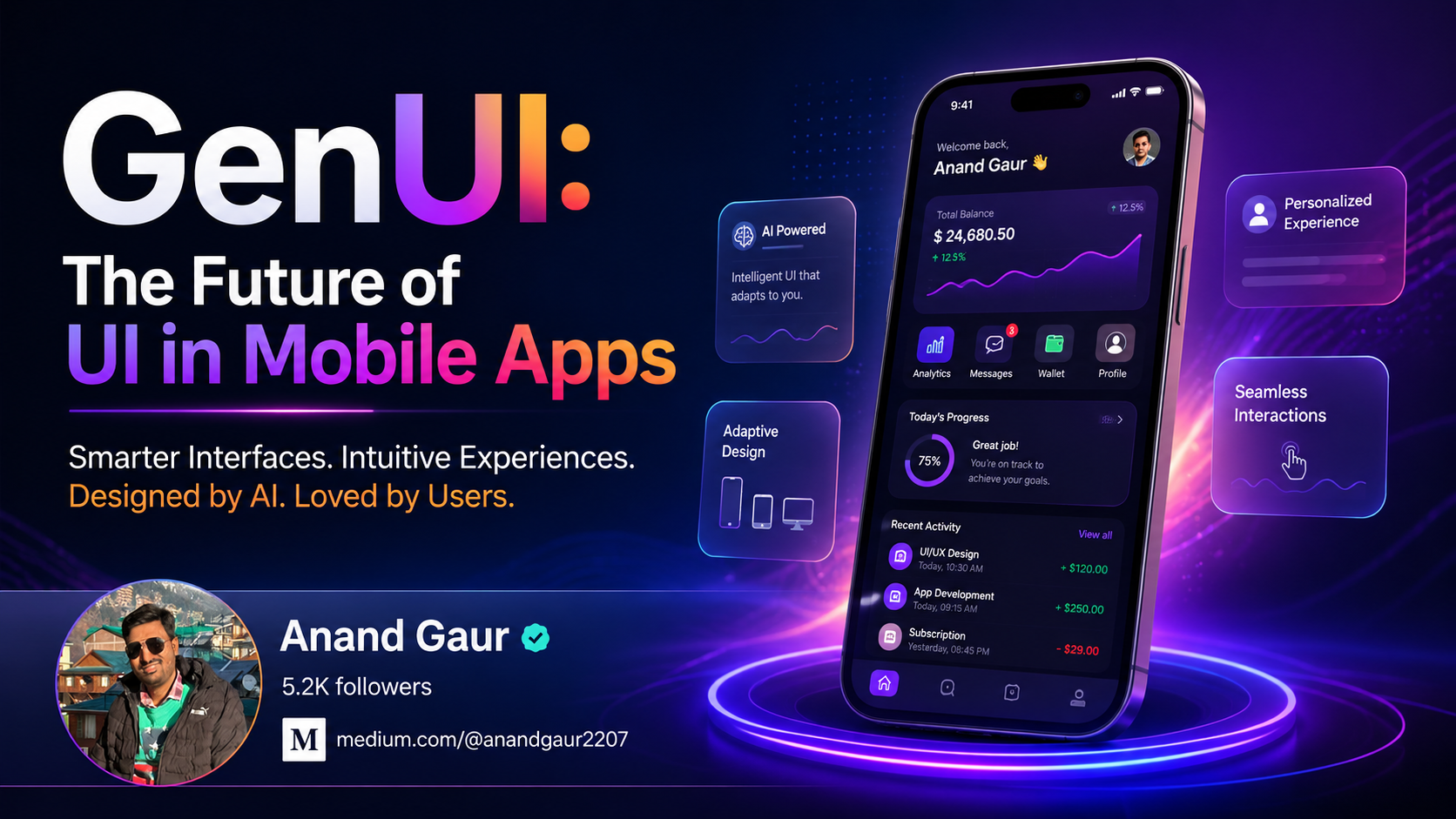
Imagine opening your banking app on a Monday morning. Instead of the same dashboard you have seen a thousand times, the screen shows exactly what you need right now: your weekend spending summary, a flagged charge that looks unusual, and a one-tap option to move money to your savings — because the app remembered you do this every Monday.
You did not tap a menu. You did not search. The interface just knew.
This is the promise of Generative UI — or GenUI for short. And it is not science fiction. It is already shipping inside apps you use every week.
This essay is a slow walk through the idea, from the simplest possible explanation up to the architecture, the platforms, the tradeoffs, and where it is headed. No prior knowledge needed.
What is GenUI, really?
Let us start as simply as possible.
For the last twenty years, app interfaces have been designed by humans, frozen into code, and shipped to millions. Every user opens the same app and sees the same buttons in the same places. If a developer wants different layouts for different users, they have to manually code every variation.
GenUI flips this.
Generative UI is an interface that an AI model creates, assembles, or rearranges in real time, based on what the user actually needs in that moment.
Think of it like a restaurant.
A traditional UI is the printed menu — the same options in the same order, for everyone. A GenUI is a personal waiter who already knows you are vegetarian, allergic to peanuts, in a hurry today, and craving something spicy. The “menu” they bring is custom-built just for this visit.
Same kitchen. Wildly different experience.
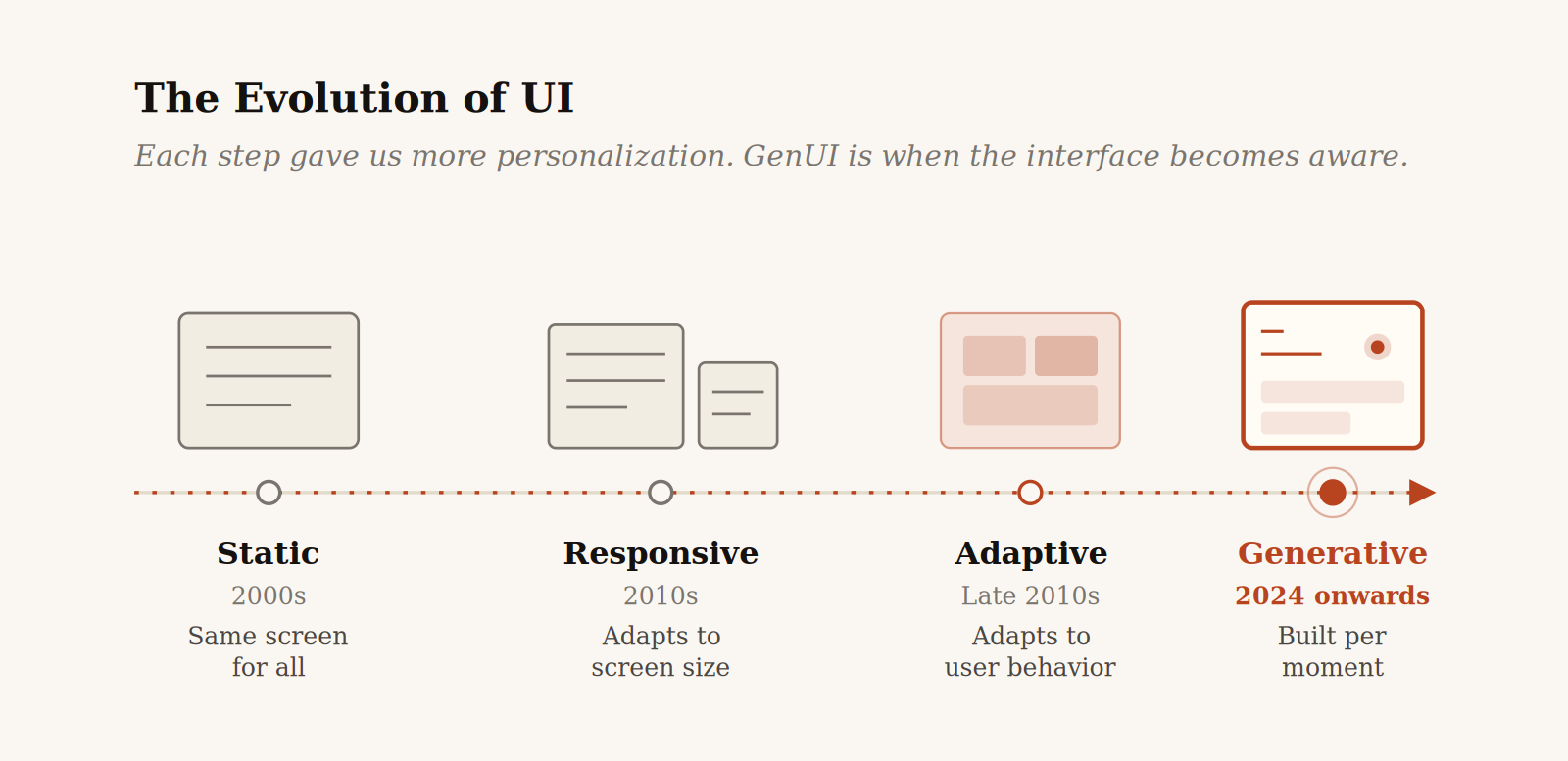
Figure— The four-stage evolution from fixed screens to interfaces that assemble themselves.
The road that brought us here
GenUI did not appear out of nowhere. It is the latest step in a long evolution:
- Static UI (2000s): Desktop websites with fixed layouts. Same screen for everyone, regardless of device.
- Responsive UI (2010s): Screens that adapt to size — mobile, tablet, desktop. The first real acknowledgment that one-size-fits-all does not work.
- Adaptive UI (Late 2010s): Apps that change based on user behavior, A/B testing, and segmentation. Netflix shows different artwork based on what you have watched.
- Generative UI (2024 onwards): The interface itself is created on-the-fly by AI — components are chosen, arranged, and rendered based on intent and context.
Each step gave us more personalization. GenUI is the step where the interface becomes aware.
How does GenUI actually work?
This is where the magic stops being magic. Once you see the pipeline, it stops feeling mysterious and starts feeling inevitable.
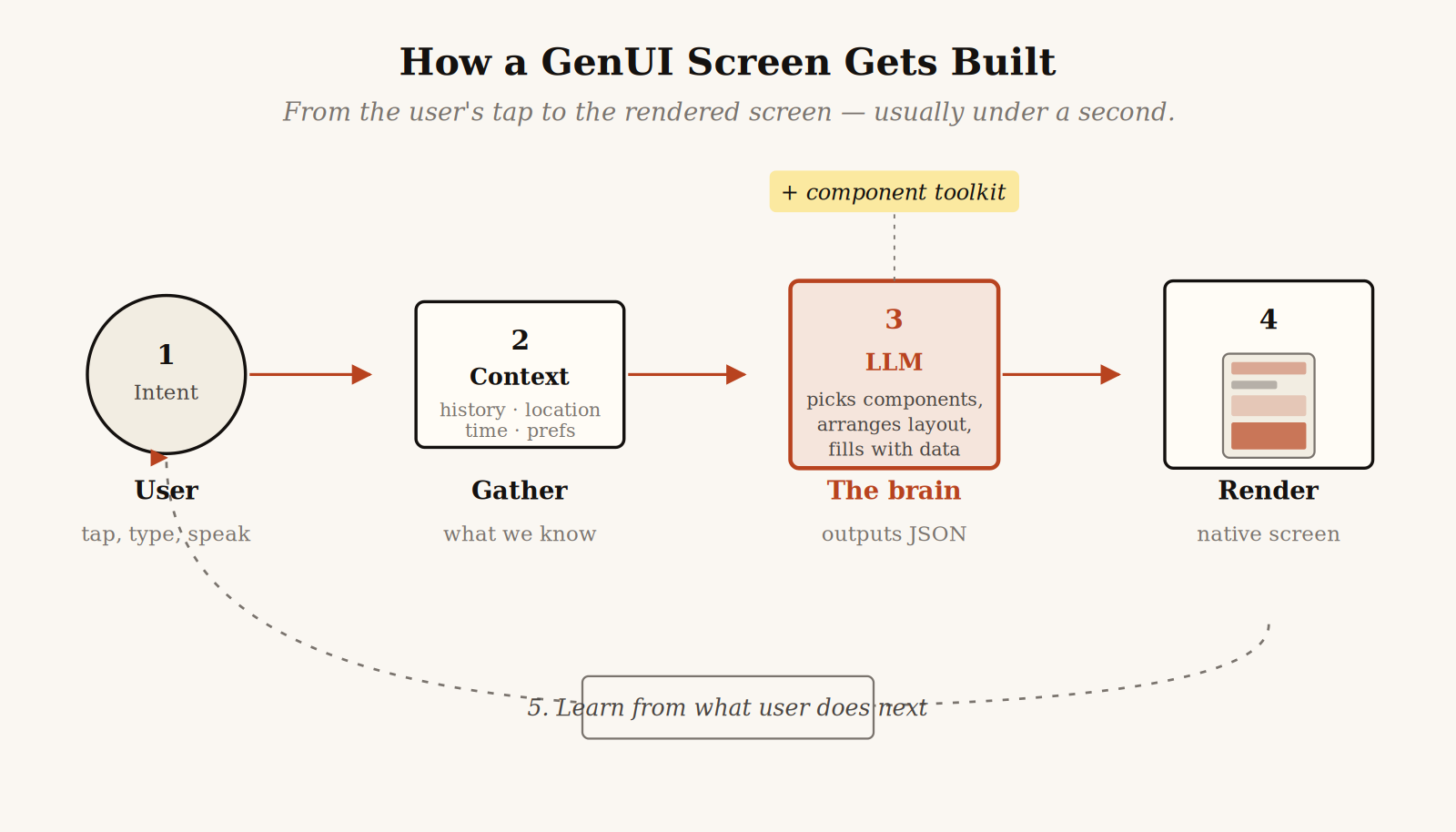
Figure — The five-step generative loop: capture intent, gather context, ask the model, render the result, learn from what happens next.
Let me walk through each step in plain language.
Step 1 — Capture intent
The user does something — types, taps, speaks, or just opens the app. The system captures not only what they did, but the surrounding context: location, time, recent activity, device.
Step 2 — Gather context
The app pulls together what it knows about this moment. Recent transactions, the calendar entry that just ended, the playlist they were just listening to. This is the “memory” of the session.
Step 3 — Ask a Large Language Model
Intent + context is sent to an AI model (Claude, GPT, Gemini). The model is given a component toolkit — a library of pre-built UI pieces the app already has: cards, buttons, charts, forms, maps, lists.
The model does not draw pixels. It reasons about which components to pick, in what order, with what data — and outputs structured instructions, usually JSON.
Step 4 — Render
The app receives the JSON and assembles it into a real, native screen. Smooth scrolling, real animations, real tap targets. To the user, it looks like any normal screen — except it never existed before.
Step 5 — Learn
The system observes what the user does next. Did they tap the suggested action? Scroll past the chart? Dismiss the prompt? This feedback shapes future generations.
The whole loop happens in milliseconds.
A concrete example
Say you open a travel app and type: “Plan a weekend in Tokyo, I love food and quiet places.”
A traditional app would:
- Show generic search results
- List hotels in default order
- Ask you to click through 10 screens
- Make you build the itinerary yourself
A GenUI app would:
- Generate a curated 3-day itinerary card
- Embed a map of food spots and gardens
- Suggest a hotel matching “quiet”
- Add “swap this restaurant” chips
No engineer designed this exact screen. The AI assembled it from a component library, just for this query, this user, right now.
Why mobile especially?
GenUI on the web is interesting. On mobile, it is a paradigm shift. Here is why phones are the perfect playground:
- Limited screen space. Phones can only show so much at once. Choosing the right thing to show matters more than on desktop.
- High-context usage. Phones know your location, motion, time, calendar — rich signals GenUI can use.
- Fast, single-handed interactions. Mobile users want answers, not navigation. GenUI removes navigation entirely.
- Frequent micro-sessions. People open mobile apps for 15-second bursts. There is no time to “explore” — the right interface should appear instantly.
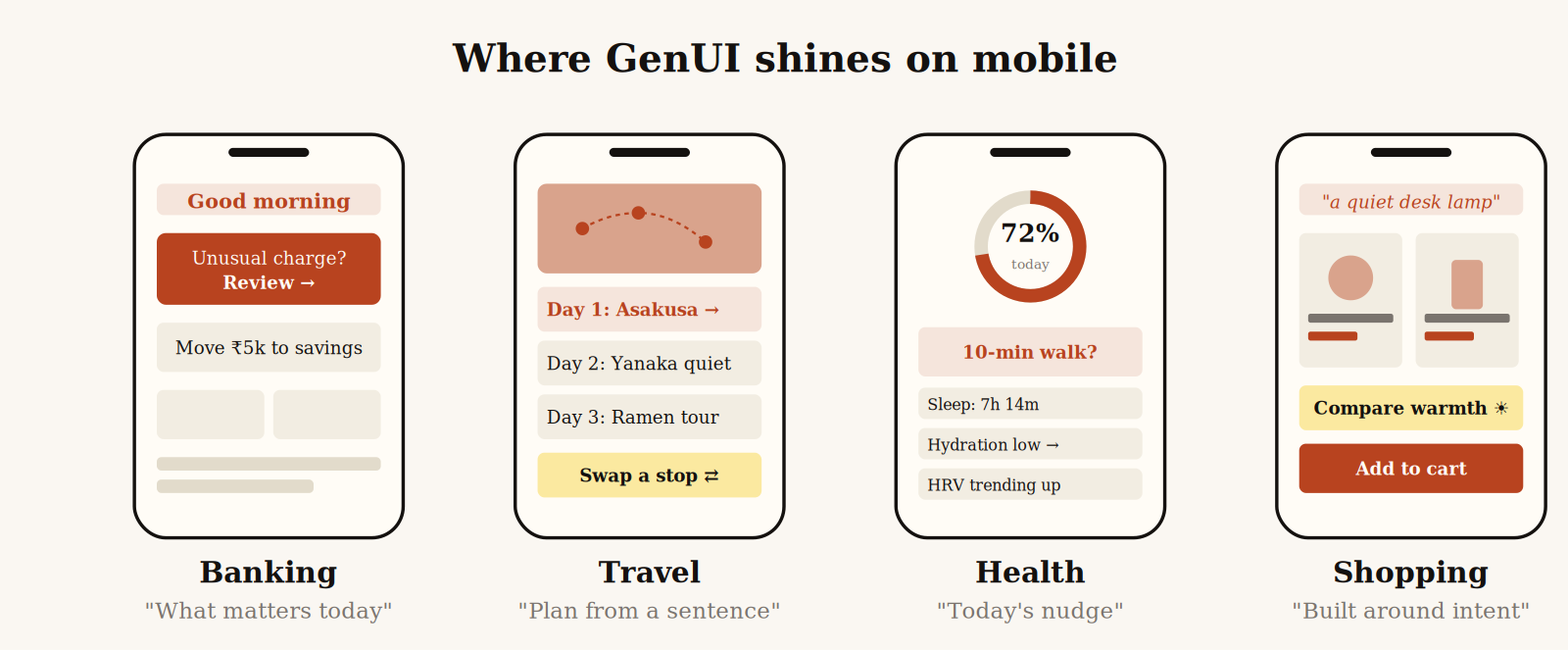
Figure — Four mobile contexts where the screen does not exist until the moment you need it.
Real-world examples already shipping
This is not theoretical. Several products already use GenUI ideas in the wild:
- Apple Intelligence and Siri: generates contextual actions and small UI snippets from natural language.
- Google Gemini on Android: dynamic widgets and shortcuts based on what you are doing.
- Vercel v0: generates entire React UIs from a prompt — a developer-side preview of where consumer apps are heading.
- Meta AI inside Instagram and WhatsApp: renders inline rich responses — cards, lists, images — based on chat queries.
- Perplexity, ChatGPT and Claude apps: render interactive components — tables, charts, code blocks — on demand based on the conversation.
The pattern across all of these: the screen is no longer pre-designed. It is composed.
The toolkit: platforms powering GenUI today
In 2026, “GenUI” is not a single technology — it is a stack. Different companies are racing to own different layers, and a quick map will save you a lot of confusion.
The first thing to understand is that GenUI tools split into two very different camps:
- Build-time GenUI — AI generates the code, a developer reviews it, and that code ships inside the app. The AI never runs on the user’s phone. Think of it as an AI pair-programmer.
- Runtime GenUI — AI generates the UI live, while the user is using the app. Each screen may be assembled fresh based on intent and context. The AI is part of the running product.
Both matter. They solve different problems. Here is how the major platforms map across both camps.
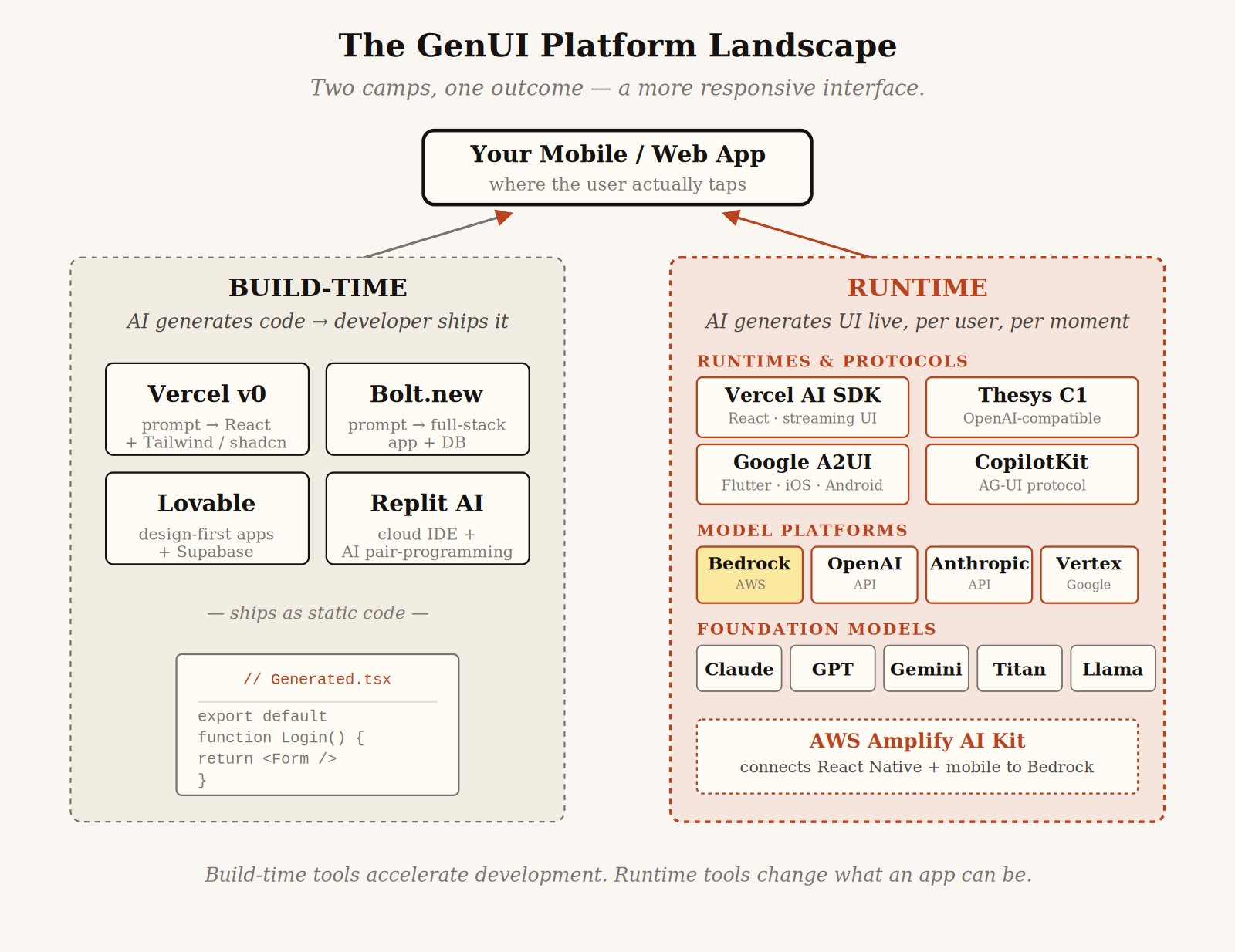
Figure — The 2026 GenUI landscape — where each major platform sits, and how the layers connect.
Amazon Bedrock + AWS Amplify AI Kit
Amazon Bedrock is AWS’s managed gateway to foundation models — Anthropic’s Claude, Meta’s Llama, Cohere, AI21, Stability AI, and Amazon’s own Titan family — all behind a single API. Bedrock layers on Knowledge Bases for retrieval, Guardrails for safety filtering, and AgentCore for orchestrating multi-step agents.
For mobile builders, the relevant piece is the Amplify AI Kit. It is the fullstack glue that lets a React Native or web app talk to Bedrock — handling conversation history, custom UI components, and tool calling out of the box. If your team already lives in AWS and needs enterprise compliance, this is the most natural path.
Google A2UI + the Flutter GenUI SDK
Released in late 2025 and pushed to v0.9 in April 2026, A2UI (Agent-to-User Interface) is Google’s open-source protocol for letting agents “speak UI.” Instead of returning text or HTML, an agent emits a JSON description of components, and the client renders it using its own native widgets.
The interesting part for mobile: A2UI is genuinely cross-platform. The same agent response can render on Flutter (iOS, Android, web, desktop), React, Angular, Lit, SwiftUI, or Jetpack Compose. The Flutter GenUI SDK uses A2UI under the hood, and Google itself runs it inside Opal and Gemini Enterprise. If you need GenUI that runs on iOS and Android and web from one backend, this is the strongest answer right now.
Vercel AI SDK + v0
The Vercel AI SDK is the most widely adopted runtime GenUI library — over 20 million monthly downloads. It open-sourced its generative UI tech in early 2024 and is tightly coupled to React and Next.js, with native streaming, tool calls, and React Server Components.
v0 (rebranded from v0.dev to v0.app in early 2026) is the build-time companion: type a prompt, get production-ready React code with Tailwind and shadcn/ui. As of March 2026, v0 has crossed 6 million developers. If your stack is React or Next.js, this is the path of least resistance.
Thesys C1 + OpenUI
Thesys, a 2024 San Francisco startup, took a clever shortcut. Their C1 API speaks the same shape as OpenAI’s API — but instead of plain text, it returns structured UI components. Change one URL in your code, and your existing chatbot starts producing tables, charts, and forms instead of paragraphs.
OpenUI is their open-source spec — an attempt to standardize the language between AI and the renderer. It is LLM-agnostic and works with Anthropic, OpenAI, Gemini, and others. Best for teams who already have an LLM-powered app and want to upgrade from “wall of text” to live UI fast.
CopilotKit + AG-UI
CopilotKit is the leading framework for embedding AI copilots into existing applications. Its AG-UI Protocol standardizes the agent-to-frontend connection, and as of late 2025 it has day-zero compatibility with Google’s A2UI — meaning agents speaking AG-UI can render UI through A2UI on whatever client framework you use. CopilotKit reports adoption at more than 10% of the Fortune 500.
Build-time tools: Bolt, Lovable, Replit
These are not runtime GenUI in the strict sense — but they are how most developers will first touch generative interfaces:
- Bolt.new — full-stack apps (frontend + backend + database) generated from a single prompt, with hosting baked in.
- Lovable — design-first; produces full apps with a Supabase backend, GitHub sync, and one-click deploy.
- Replit AI — full cloud IDE with an AI pair-programmer; less prompt-to-app, more accelerated hand-coding.
How to choose
A quick rule of thumb:
- Already on AWS and need enterprise compliance → Bedrock + Amplify AI Kit.
- Targeting Flutter or true cross-platform mobile → A2UI + Flutter GenUI SDK.
- All-in on React or Next.js → Vercel AI SDK + v0.
- Want a fast drop-in runtime for an existing chatbot → Thesys C1.
- Embedding a copilot inside an existing app → CopilotKit + AG-UI.
- Just generating screens at design time → v0, Bolt, or Lovable.
The good news: these platforms are increasingly compatible. CopilotKit ships with A2UI support. A2UI works with any model that produces JSON. Bedrock hosts the same Anthropic and Meta models that the Vercel AI SDK can also call. The walls between camps are thinner than the marketing suggests.
What is under the hood
For builders and the curious, here is the rough technical stack of a GenUI mobile app:
- Component library. A registered, well-described set of UI primitives. Each component has a name, a description, a schema, and a list of props.
- Tool / function calling. The LLM is given access to these components as “tools” it can call. Modern APIs from Anthropic, OpenAI, and Google support this natively.
- Streaming renderer. As the LLM generates JSON, the app starts rendering immediately — so the screen feels instant, not laggy.
- State and memory layer. What the user did before, their preferences, and recent context.
- Guardrails. Safety checks that prevent broken layouts, harmful content, or invalid actions.
The hardest part is not the AI. It is designing a component library expressive enough that the AI can build almost any reasonable screen from it — but constrained enough that it cannot produce a mess.
The hard parts
GenUI is not a free lunch. Real challenges:
- Latency. Even fast LLMs add 200ms to 2 seconds. For mobile, every millisecond matters. Streaming and on-device models help, but it is a real constraint.
- Predictability. Users build habits. If the home screen changes every time, that is confusing, not helpful. Good GenUI knows when not to change.
- Cost. Every AI-generated screen is an inference call. At scale, this adds up fast.
- Accessibility. AI-generated layouts must still respect screen readers, contrast ratios, and font scaling. Easy to break by accident.
- Trust. Users are still learning to trust AI-driven interfaces. A misplaced button can erode confidence quickly.
- Quality control. A designer can review ten screens. They cannot review ten million dynamic ones. New tools are needed to test design quality at scale.
Where this is headed
Zoom out. In the next 2 to 3 years, expect to see:
- Fully conversational apps where the home screen is a chat field, and every screen below it is generated.
- On-device GenUI powered by small, fast local models — eliminating latency and privacy issues.
- Cross-app GenUI where one assistant generates a screen pulling from multiple apps at once.
- Voice-first GenUI where speaking generates an interface that augments what you said, rather than replacing it.
- Generative design systems that adapt brand and style automatically.
The deeper shift: the app as a fixed entity may dissolve. What replaces it is something more like an intent layer — you express what you want, and the right interface assembles itself.
Three things to take with you
1. The interface is becoming a conversation. Not literally always chat — but always responsive to intent, not navigation.
2. Component thinking matters more than screen thinking. Designers and developers should build flexible, composable pieces — not fixed flows.
3. Every mobile app will be touched by this. Banking, fitness, dating, productivity, gaming — if it has a screen, GenUI will reshape it.
The apps that win the next decade will not be the ones with the prettiest static screens. They will be the ones that vanish into the user’s intent — that feel less like “an app you use” and more like “a screen that just appeared, exactly when you needed it.”
That is GenUI. And it is already on its way to your phone.
Thank you for reading. 🙌🙏✌.
Need 1:1 Career Guidance or Mentorship?
If you’re looking for personalized guidance, interview preparation help, or just want to talk about your career path in mobile development — you can book a 1:1 session with me on Topmate.
I’ve helped many developers grow in their careers, switch jobs, and gain clarity with focused mentorship. Looking forward to helping you too!
Found this helpful? Don’t forgot to clap 👏 and follow me for more such useful articles about Android development and Kotlin or buy us a coffee here ☕
💥 Level Up Your Mobile Developer Interview !
Crack Android Interviews Like a Pro
Your complete Android interview preparation book — packed with real questions, deep explanations, and practical insights to help you stand out.
👉 Grab your copy now:
https://medium.com/@anandgaur2207/crack-android-interviews-with-confidence-the-only-handbook-youll-need-b87ec525f19c
iOS Developer Interview Handbook
From Swift fundamentals to advanced iOS concepts — a complete handbook to help you prepare smartly and confidently.
👉 Explore the book:
https://medium.com/@anandgaur2207/crack-ios-developer-interviews-with-confidence-the-complete-ios-developer-handbook-f1eabc3d7a21
Flutter Developer Interview Handbook
Ace your next Flutter interview with scenario-based questions, detailed explanations, and hands-on examples that make you stand out.
👉 Explore the book:
https://medium.com/@anandgaur2207/crack-flutter-developer-interviews-with-confidence-the-complete-flutter-developer-interview-6cb53996832c
React Native Developer Interview Handbook
Crack your next React Native interview with confidence!
This guide is packed with scenario-based questions, detailed explanations, and hands-on examples to help you stand out and succeed.
👉 Explore the book:
https://medium.com/@anandgaur2207/react-native-interview-crack-your-next-interview-with-confidence-0d7255a20fe1
If you need any help related to Mobile app development. I’m always happy to help you.
Follow me on: